Inspyder OrFind4.0.0
Publisher Description
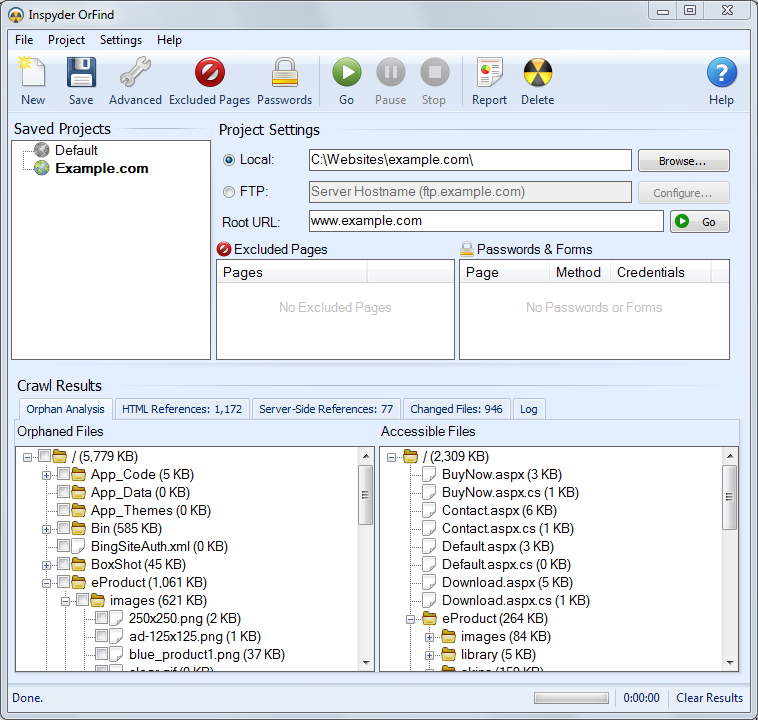
Find and remove unlinked files from your website with OrFind! Is your website several generations old? Have you inherited a website that has not been well maintained? If you need to figure out which files your website is actually using and which are left over from years gone by, than you need OrFind.
OrFind automatically crawls each page of your website and analyzes the linking structure. It compares the files crawled to the files stored on your server and determines which files are needed and which are orphaned.
OrFind can automatically backup and remove orphaned files, saving disk space and making website maintenance easier. Don't let unused files and out dated content become a liability for your website, clean it up today!
OrFind is easy to use but powerful enough to handle complex websites. OrFind's easy to use exclusion list allows you to quickly filter out specific files and folders. OrFind's unique folder view allows you to backup and delete specific orphan files or entire directories at once.
Download a trial copy and remove unused files from your website today!
About Inspyder OrFind
This Site Administration program is available in English. It was last updated on 29 September, 2026. Inspyder OrFind is compatible with the following operating systems: Windows.
The company that develops Inspyder OrFind is Inspyder Software Inc.. The latest version released by its developer is 4.0.0. This version was rated by 1 users of our site and has an average rating of 4.0.
The download we have available for Inspyder OrFind has a file size of 21.0 MB. Just click the green Download button above to start the downloading process. The program is listed on our website since 2013-04-24 and was downloaded 291 times. We have already checked if the download link is safe, however for your own protection we recommend that you scan the downloaded software with your antivirus. Your antivirus may detect the Inspyder OrFind as malware if the download link is broken.
How to install Inspyder OrFind on your Windows device:
- Click on the Download button on our website. This will start the download from the website of the developer.
- Once the Inspyder OrFind is downloaded click on it to start the setup process (assuming you are on a desktop computer).
- When the installation is finished you should be able to see and run the program.
Program Details
System requirements
Download information
Pricing
Version History
version 4.0.0
posted on 2013-04-24
- New server-side code analysis
- Improved project management
- Updated crawler parses PDF and RTF links
- Automatic Pause/Resume on Windows Standby/Hibernate
